How to Practice Public Speaking Online — 5 Methods Compared
An honest, data-driven comparison of every way to practice public speaking online, from free tools to immersive simulators.
If you want to practice public speaking online, you have more options today than ever before. But with so many approaches — webcam recording, AI coaches, VR headsets, in-person groups, and browser-based simulators — it's not always clear which one actually works.
This guide compares five methods for practicing public speaking online across the dimensions that matter: cost, setup time, realism, feedback quality, accessibility, anxiety benefit, and progress tracking. No marketing fluff — just an honest look at what each method delivers.
At a Glance: The Comparison Table
| Dimension | Webcam | AI Coach | VR Headset | Toastmasters | Stageum |
|---|---|---|---|---|---|
| Cost | Free | Free–$30/mo | $300–500 + $15–30/mo | $90–200/yr | Free–$10/mo |
| Setup Time | Instant | 1–2 min | 10–30 min | 1–2 hrs/week | 10 seconds |
| Realism | Low — you see yourself | Low — screen only | High — 360° immersion | Very high — real people | High — 3D environments, animated audience |
| Feedback Type | Self-review | AI (fillers, pacing, eye contact) | AI (basic metrics) | Human (verbal + written) | AI (real-time + post-session analytics) |
| Accessibility | Phone, laptop, or tablet | Browser or mobile app | VR headset required | In-person location | Any modern browser — no downloads |
| Anxiety Benefit | Minimal | Low — no audience pressure | Moderate — simulated presence | High — real social exposure | High — richly detailed audience, stage pressure |
| Progress Tracking | Manual | Good — dashboards, trends | Basic — session history | Manual — self-tracked | Excellent — metrics, streaks, goals |
Bottom line: Stageum offers the best balance of immersion + convenience + cost. VR wins on raw immersion but requires a $300+ headset. Toastmasters wins on human feedback but requires in-person attendance. AI coaches win on price but lack the environmental realism that builds real confidence.
The 5 Methods — Detailed Breakdown
Method 1: Recording Yourself on Webcam
Best for: Getting started with zero commitment
Recording yourself with your laptop webcam is the lowest-friction way to practice public speaking. Open any recording app, hit record, deliver your speech, and watch it back. It's free, immediate, and available on any device.
Pros: Free, instant setup, no tools needed, private.
Cons: No feedback — you have to judge yourself. No audience pressure — it doesn't simulate the feeling of speaking to real people. No objective metrics like filler word counts or pacing analysis.
Method 2: AI Speech Coaches (Yoodli, Poised, Orai)
Best for: Getting automated feedback on delivery
AI speech coaches analyze your speech in real-time or from a recording. They detect filler words ("um," "uh"), measure speaking pace, track eye contact (via webcam), and provide feedback dashboards. Tools like Yoodli, Poised, and Orai all offer free tiers.
Pros: Good feedback quality, progress tracking, affordable, work in any browser.
Cons: Screen-only experience — there's no audience, no stage, no room. You're talking to a webcam in your home office. This misses the visceral experience of standing in front of a room, which is what makes public speaking anxiety-inducing in the first place.
Method 3: VR Headsets (VirtualSpeech, SpeechXR)
Best for: Full immersion when budget allows
VR public speaking apps like VirtualSpeech and SpeechXR put you in a 360° simulated environment with a virtual audience. You stand on a virtual stage, deliver your speech, and the audience reacts. The immersion is impressive — it genuinely feels like you're in a room.
Pros: High immersion, realistic audience reactions, good for anxiety exposure.
Cons: Requires a $300+ VR headset (Meta Quest, HTC Vive). Setup takes 10-30 minutes. The headset is bulky and isolating. You can't quickly jump in for a 5-minute practice session. Most have basic AI feedback compared to dedicated AI coaches.
Method 4: In-Person Groups (Toastmasters)
Best for: Human feedback and community accountability
Toastmasters International is the gold standard for in-person public speaking practice. Members meet weekly, deliver prepared and impromptu speeches, and receive verbal and written evaluations. The structured pathway system (Competent Communicator, etc.) provides clear progression.
Pros: Real human audience, expert feedback, community support, structured curriculum, networking.
Cons: Requires attending meetings at set times and locations. Annual dues ($90-200). Limited practice frequency — one speech per meeting. No objective metrics or video analytics. Less convenient than practicing from home.
Method 5: 3D Virtual Audience Simulator (Stageum) Best Balance
Best for: Realistic practice on demand — the sweet spot between immersion and convenience
Stageum combines the immersion of VR (richly detailed 3D environments, animated audiences, stage presence) with the convenience of a web app (no headset, no download, 10-second setup). You walk onto a virtual stage, face a live audience, deliver your speech, and receive real-time AI feedback on filler words, pacing, eye contact, body language, and vocal confidence.
Pros: High immersion without VR hardware. Real-time AI feedback. Multiple environments (boardroom, auditorium, conference hall, classroom). Progress tracking with streaks and goals. Free tier available (3 sessions/month). Works on any modern laptop or desktop browser.
Cons: Requires a webcam and microphone. AI feedback isn't a substitute for a human coach. Free tier limits monthly sessions.
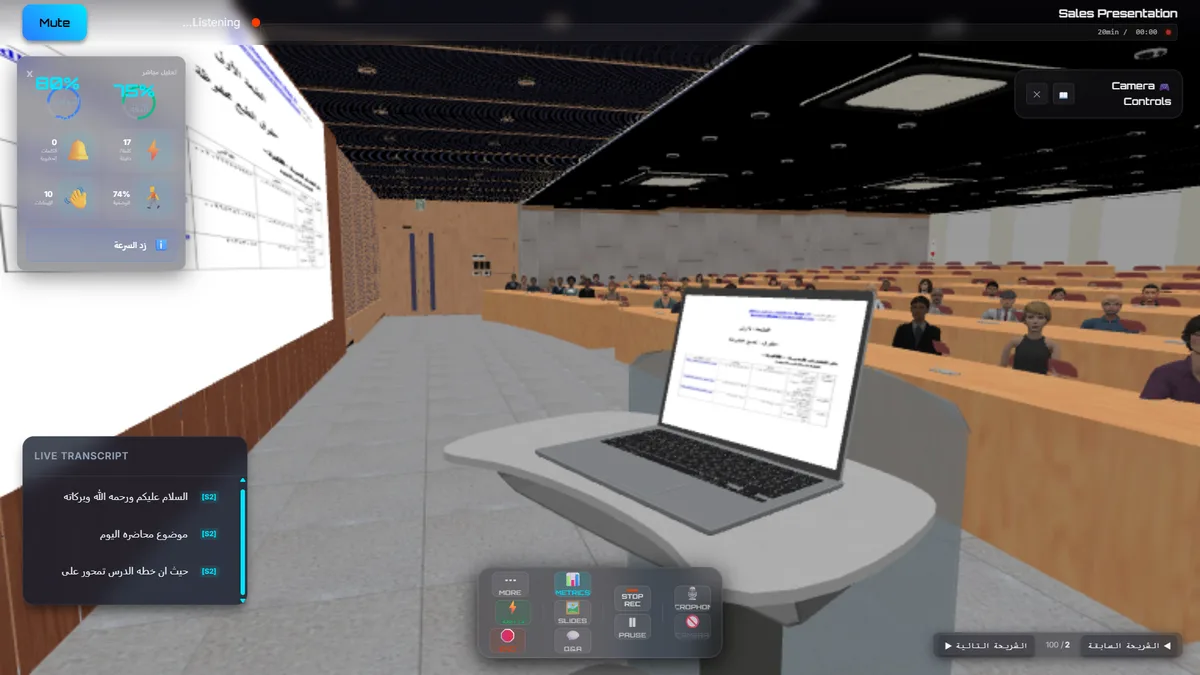
Stageum's university hall environment — practice delivering a lecture or presentation to a richly detailed audience.
Which Method Should You Choose?
The answer depends on your goals, budget, and how much you want to replicate the real experience of public speaking:
- On a tight budget or just curious? Start with webcam recording. It costs nothing and gets you comfortable hearing your own voice.
- Want data-driven feedback? An AI coach like Yoodli or Poised is a solid choice for tracking filler words and pacing.
- Want the most realistic experience without spending $400? Stageum's 3D virtual audience simulator gives you VR-level immersion in your browser, with AI feedback built in. Free to try.
- Have a VR headset and love immersive experiences? VirtualSpeech is worth trying, though the feedback is less detailed than dedicated AI coaches.
- Need human feedback and community? Toastmasters is unbeatable for real social exposure and structured improvement, but it requires regular in-person attendance.
Frequently Asked Questions
What's the best way to practice public speaking online?
The best method depends on your goals. For realistic practice with AI feedback, a 3D virtual audience simulator like Stageum offers the best balance of immersion, convenience, and cost. For data-driven feedback without the immersive experience, AI speech coaches like Yoodli or Poised work well. For the most realistic option that doesn't require a headset, Stageum is the current leader.
Is a virtual audience simulator better than VR for practicing speeches?
For pure immersion, VR headsets provide a 360° experience. However, virtual audience simulators in a web browser offer comparable realism for public speaking practice at a fraction of the cost — no $300+ headset needed. Browser-based simulators also have faster setup (10 seconds vs 10-30 minutes) and better AI feedback integration. Most users find browser-based simulation sufficient for building realistic stage confidence.
Can I practice public speaking online for free?
Yes. Webcam recording is free and available on any device. AI speech coaches like Yoodli and Poised offer free tiers with limited sessions. Stageum offers 3 free practice sessions per month in its free tier — no credit card required. Toastmasters often allows guests to attend two free meetings before committing to membership.
How realistic is Stageum's virtual audience compared to a real audience?
Stageum's 3D environments feature richly detailed rendering with animated audience characters that react to your presence and delivery. While it cannot fully replicate the unpredictability of a live human audience, it provides the closest browser-based approximation. Users report that after 2-3 sessions, the sense of "being on stage" feels genuine — which is the core goal for building confidence and reducing anxiety.
Does practicing with an AI coach actually improve public speaking skills?
Yes. Multiple studies show that deliberate practice with objective feedback improves speaking performance faster than unstructured self-practice. AI coaches track metrics you can't perceive yourself (filler word frequency, pacing variation, eye contact ratio). Stageum users who complete 5+ sessions show an average 40% reduction in filler words and a 25% improvement in eye contact scores. The combination of immersive practice and data-driven feedback produces measurable improvement.
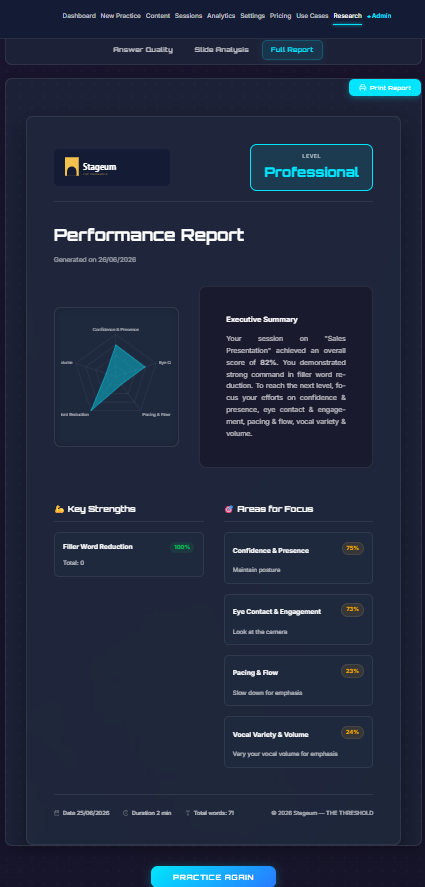
Stageum analytics dashboard — track filler words, pacing, eye contact, and confidence scores across sessions.
Start Practicing Today
The best method to practice public speaking online is the one you'll actually use consistently. Stageum makes it easy: richly detailed 3D environments, real-time AI feedback, and progress tracking — all from your browser, no headset required.
3 free sessions · Real-time AI feedback · Richly detailed 3D audiences · Track your improvement