What Is a Virtual Audience Simulator?
A complete guide to browser-based 3D public speaking simulation — how it works, who it's for, and why it's changing the way professionals practice presentations.
A virtual audience simulator is a software tool that creates a realistic 3D environment with an animated audience for practicing public speaking. Unlike recording yourself on webcam, a simulator places you on a virtual stage in a richly detailed room with an audience that responds to your presence. Unlike VR headsets, it works in any modern browser with no special hardware.
Think of it as the missing link between AI speech coaches (which give feedback but no environment) and VR headsets (which give immersion but require expensive hardware). A virtual audience simulator delivers the best of both: the immersive experience of speaking to a real audience, with the convenience and affordability of a web app.
How a Virtual Audience Simulator Works
Modern virtual audience simulators like Stageum use browser-based 3D rendering (WebGL via Babylon.js) to create richly detailed environments that run in real-time without downloads. Here's how the core components work together:
Richly detailed rooms — boardroom, auditorium, conference hall, classroom — rendered in real-time via WebGL. Each environment has proper lighting, seating layout, and stage positioning.
Individual audience characters with natural movement and reactions. The audience faces you, shifts posture, and creates the visual pressure of speaking to a real group.
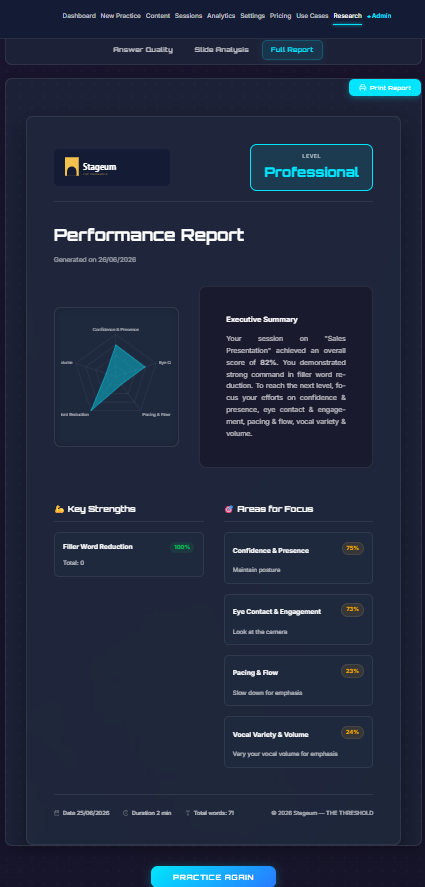
AI analyzes filler words, speaking pace, eye contact, body language, and vocal confidence as you speak — delivering metrics both live and in a post-session dashboard.
You stand on a virtual stage or podium, positioned at the front of the room. The spatial arrangement creates the psychological experience of addressing an audience.
Virtual Audience Simulator vs. Alternatives
Understanding what makes a virtual audience simulator different requires comparing it to the other common methods for practicing public speaking:
| Dimension | Virtual Audience Simulator (Stageum) | AI Speech Coach (Yoodli/Poised) | VR Headset (VirtualSpeech) | Webcam Recording |
|---|---|---|---|---|
| 3D Environment | Yes — richly detailed | No — screen only | Yes — 360° VR | No — your room |
| Animated Audience | Yes — reacts naturally | No | Yes — basic reactions | No |
| AI Feedback | Real-time + post-session | Real-time + dashboard | Basic metrics | None (self-review) |
| Hardware Needed | Webcam + browser | Webcam + browser | $300+ VR headset | Webcam |
| Setup Time | 10 seconds | 1-2 minutes | 10-30 minutes | Instant |
| Cost | Free – $10/mo | Free – $30/mo | $300-500 + $15-30/mo | Free |
| Social Anxiety Benefit | High — simulates audience pressure | Low — no audience present | Moderate — simulated presence | Minimal |
The key distinction: AI speech coaches analyze your delivery but don't recreate the environment. A virtual audience simulator recreates the full experience — the stage, the room, the audience — so you build confidence in the actual conditions that trigger public speaking anxiety.
Who Benefits from a Virtual Audience Simulator?
Executives & Leaders
Practice boardroom presentations and all-hands meetings in a realistic corporate environment. Refine executive presence, pacing, and message delivery before high-stakes presentations.
Sales Professionals
Rehearse pitch decks and client presentations in a conference room setting. Get AI feedback on filler words and confidence to close deals more effectively.
Academics & Educators
Practice lectures, conference talks, and classroom presentations in a university hall environment. Build confidence delivering to large audiences.
Job Seekers
Prepare for interview presentations, panels, and public speaking portions of the hiring process. Practice in realistic settings without the pressure of a real audience.
Anyone with Public Speaking Anxiety
A virtual audience simulator provides a safe environment for exposure therapy — gradually building comfort with the experience of speaking to a room. The ability to practice repeatedly in realistic conditions reduces anxiety more effectively than mirror practice or webcam recording.
Key Features to Look for in a Virtual Audience Simulator
Not all virtual audience simulators are equal. Here are the features that matter most:
- Richly detailed rendering — environments should look and feel real, not cartoonish
- Animated audience — static audience models don't create the same psychological pressure
- Real-time AI feedback — metrics on filler words, pacing, eye contact, and body language while you speak
- Multiple environments — different rooms for different contexts (boardroom vs. auditorium vs. classroom)
- Progress tracking — the ability to see improvement across sessions with streaks, trends, and goals
- Browser-based — no downloads, no headset, no IT setup — opens in any modern browser in seconds
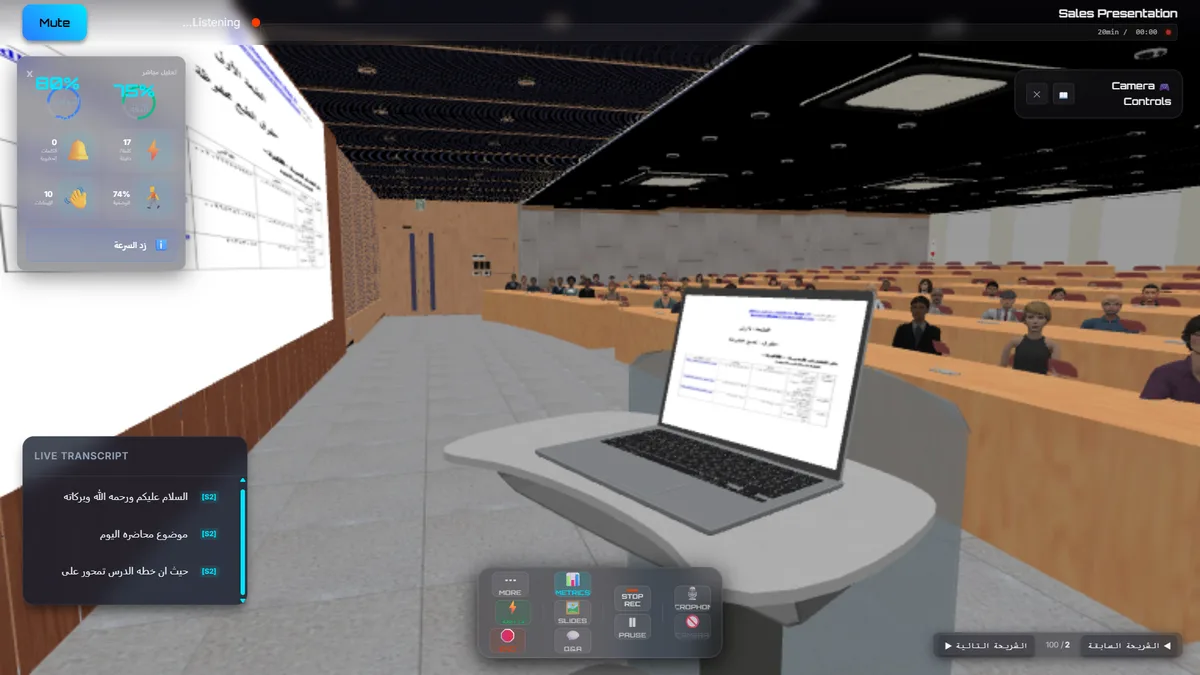
Stageum's virtual audience simulator — practice delivering a presentation in a richly detailed university hall with an animated audience.
Why Browser-Based Beats VR for Most People
VR headsets like Meta Quest offer impressive 360° immersion, but they come with significant barriers:
- Cost: $300-500 for the headset, plus $15-30/month for apps
- Friction: 10-30 minutes to set up, charge, and put on the headset
- Isolation: you're cut off from your environment, making quick practice sessions impractical
- Hardware dependency: only works if you own and have access to a specific device
Browser-based virtual audience simulators eliminate every one of these barriers. You open a link, choose your environment, and start practicing in under 10 seconds. The tradeoff in immersion (slightly less than VR) is negligible for most users, while the gains in convenience, cost, and accessibility are massive.
Frequently Asked Questions
What is a virtual audience simulator?
A virtual audience simulator is a software tool that creates a realistic 3D environment with an animated audience for practicing public speaking. It places you on a virtual stage in a richly detailed room where you deliver your speech to a simulated audience, with AI providing real-time feedback on your delivery.
Do I need a VR headset to use a virtual audience simulator?
No. Modern virtual audience simulators like Stageum run entirely in your web browser using WebGL. All you need is a laptop or desktop computer with a webcam and microphone. No headset, no downloads, no special hardware.
How is a virtual audience simulator different from an AI speech coach?
AI speech coaches like Yoodli or Poised analyze your webcam feed and provide feedback on filler words, pacing, and eye contact — but you're looking at yourself on a screen. A virtual audience simulator recreates the full experience of being on stage with an audience, adding environmental realism that AI coaches don't provide.
Can a virtual audience simulator help with public speaking anxiety?
Yes. Virtual audience simulators are effective tools for exposure therapy — gradually building comfort with the experience of speaking to a room. The safe, repeatable environment allows you to practice without real-world consequences, reducing anxiety over time.
Is Stageum's virtual audience simulator free?
Stageum offers a free tier with 3 practice sessions per month, giving you full access to all environments and AI feedback. Pro plans at $10/month unlock unlimited sessions, advanced analytics, and priority support. No credit card required for the free tier.
Start Using a Virtual Audience Simulator Today
The best way to understand what a virtual audience simulator can do is to try one. Stageum gives you richly detailed 3D environments, real-time AI feedback, and progress tracking — all from your browser, no headset required.
3 free sessions · Real-time AI feedback · Richly detailed 3D audiences · Track your improvement